
The performance-optimised, user-friendly servo drive system comprises a SINAMICS V90 servo drive and a SIMOTICS-1FL6 servomotor. Different frame sizes and motor shaft heights cover a wide range of applications for operation on single- and three-phase line supplies.
There are eight servo drive frame sizes and seven motor shaft heights with power ratings ranging from 0.05 to 7.0 kilowatts, to realise a wide range of applications, with the focus on dynamic motion and processing – for example, positioning, transporting and winding.
In addition to operation in the TIA Portal V14 and higher with the new SIMATIC S7-1500 T-CPU Advanced Controller,the servo drive system is also suitable for use with the SIMATIC S7-1500 Advanced Controller and the SIMATIC S7-1200 Basic Controller.

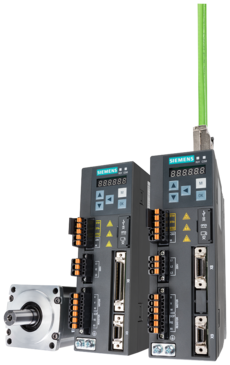
Power Range: | 1AC 0.05 kW … 0.75 kW 3AC 0.05 kW … 7 kW |
| Voltage: | 1AC 200 V…240 V (-15 % / +10 %) |
| Control modes: | Pulse Train (PTI) Version: Pulse train positioning, internal positioning, control via USS/Modbus, speed, torque PROFINET (PN) Version: Speed control via PROFINET with PROFIdrive profile |
| Degree of portection | IP20 |
SINAMICS V90 PROFINET Getting Started 12/2018
SINAMICS V90 PROFINET Operating Instructions 02/2021
SINAMICS V90 PTI, USS/Modbus Getting Started 12/2018
SINAMICS V90 PTI, USS/Modbus Operating Instructions 02/2021
Setup Guide V90 S7-1200 Pulse Train Control
V-ASSISTANT Online Help 09/2020
V90 Project Builder
Take a look at the new V90 Project Builder from HMK. Configure your V90 servo drives to the TIA portal platform in minutes rather than days. Right first time every time.
The SINAMICS V90 and SIMATIC S7-1200 combine together to create a simple to use complete motion control solution. To assist our customers to easily get the system working straight out of the box we have produced a series of videos that will get you up and running in no time at all!
The series of 4 videos are
Part 1 - Configuring SINAMICS V90 drive for PTI
Part 2 - Configuring SIMATIC S7-1200 Technology Object with PTO
Part 3 - Using S7-1200 PLCopen Motion commands to control V90
Part 4 - Optimising the SINAMICS V90 Servo Control Loop
To change the video, simply click the top left of the embedded video to access other tutorials from the V90 Channel.
Take a look at our quick un-boxing video, tells you all you need
to know about getting started.
Standalone configuration software for the setup and commissioning of SINAMICS V90 via USB connection
Download SINAMICS V-ASSISTANT v1.06.02
General system description files required for integration into control systems running older versions of TIA Portal or non-Siemens control systems
Download SINAMICS V90 PROFINET GSDML v1.04
Download SINAMICS V90 PROFINET GSDML v1.03
Download SINAMICS V90 PROFINET GSDML v1.02
To take advantage of integrated startup and commissioning of SINAMICS V90 in TIA Portal, you can use STARTDRIVE. You should use the appropriate version for your current TIA Portal installation
Download STARTDRIVE (external link)
The V90 Project Builder App is designed to automatically build and configure a TIA Project based on S7-1200/1500 and SINAMICS V90 drives. You will need to have TIA Portal v15 or later installed to use the app. Please contact us to obtain a valid licence key for installation.
300% rated torque for 300ms in 10sec
The Motor Brake Cable can be attached directly to the 400V version of the V90. The 200 V version requires an external relay to connect the motor brake cable. The relay must be connected via the setpoint cable for the SINAMICS V90 pulse train version and via I/O cable for the SINAMICS V90 PROFINET version. I/O cable is necessary for the brake control of the SINAMICS V90 PROFINET 200 V version, and for applications requiring additional DI/DO in addition to PROFINET communication.
For both power and signal motor cables, up to 20m sizes are available from Siemens. The maximum permissible length for custom cables is 30m.
Startdrive or V-Assitant can be used to configure the V90
The hardware ID may be incorrect on the LADDR input. The required ID is the one used by the telegram - not the ID of the drive. For Startdrive, this can be found in the device view by going to Properties > General > Telegram configuration > [device name] > Start address. For drives not configured with Startdive, this can be found in the device view byhighlighting the row of the telemgra in Device overview, then navigate to Properties > General > Hardware identifier.
© HMK Automation Group Ltd 2026
This site uses cookies that enable us to make improvements, provide relevant content, and for analytics and advertising purposes. For more details, see our Cookie Policy. By clicking Accept, you consent to our use of cookies.